2026 face search engine comparison
We tested three face search services on faces from two group photos to see what a user actually gets back: a direct social media profile, a post that happens to show the same person, or simply a similar-looking face. In the primary 18-face analysis, face2social found at least one confirmed match for 15 people, FaceCheck.ID for 7, and Social Catfish for 2.
20 faces · 18 in the primary analysis · 3 services compared · 3 additional tools observed
Face Search Engine Comparison: Results at a Glance
The short answer for readers who want the result first
Best in this pilot for finding direct social media profiles: face2social. It found at least one confirmed match for 15 of the 18 faces included in the primary analysis, and all 23 of its confirmed results were direct profile links. This is a pilot result, not a claim that it is the best face search engine for every person, photo, or use case.
| Metric | face2social | FaceCheck.ID | Social Catfish |
|---|---|---|---|
| People with at least one confirmed match | 15 of 18 | 7 of 18 | 2 of 18 |
| People found only by this service | 9 | 2 | 0 |
| Confirmed results | 23 | 23 | 3 |
| Confirmed results that were profile links | 23 | 3 | 3 |
| Confirmed results that were posts or other pages | 0 | 20 | 0 |
| Approx. cost per successful query* | ≈ $2.40 | ≈ $0.77 | ≈ $32.40 |
*Based on the pricing assumptions used in the original test report, not a current pricing check. A “successful query” means at least one confirmed face match, including a match on a post rather than a direct profile.
- face2social found the most people in this test. Of the 18 faces in the primary calculation, face2social returned a confirmed match for 15, FaceCheck.ID for 7, and Social Catfish for 2. Nine people were found only by face2social; two only by FaceCheck.ID.
- The identical raw match count hid very different results. face2social and FaceCheck.ID each produced 23 confirmed results. All 23 face2social results were profile links. FaceCheck.ID produced three profile links; the other 20 led to posts or pages where the person appeared.
- Small faces mattered more than overall image size. Among five reviewed faces measuring under 30 pixels on the short side, face2social found all five and FaceCheck.ID found none. The smallest confirmed FaceCheck.ID match was 34×48 pixels; for face2social it was 23×34.
- FaceCheck.ID’s confidence score did not cleanly separate correct from incorrect results. Confirmed matches scored 70–82, while the flagged false-match set scored 49–83. Nineteen of 41 flagged false results fell inside the confirmed-match score range, and the highest false result scored 83.
- A cheap search is not the same as a cheap useful result. FaceCheck.ID cost about $0.77 per successful query in the 18-face calculation, versus about $2.40 for face2social. But its cost per query that produced a direct profile was $1.80 because the other paid searches still counted toward the total cost. In this test, rerunning the same face did not buy a different result.
- face2social also had a clear coverage gap. The tested version did not search LinkedIn or OnlyFans. Every confirmed Social Catfish result in the pilot was a LinkedIn profile.
- This is a pilot, not a market-wide ranking. The test used two stock photos, 20 faces, one reviewer, and an incomplete list of the subjects’ real accounts. The numbers describe this dataset, not the entire face-search market.
- How we tested the face search tools
- Which tool found the most people?
- Low-resolution face search
- Profile links vs. posts
- Confidence scores and false matches
- Face search pricing and value
- PimEyes, Lenso.ai and TinEye
- Limitations of the test
- Which service won this pilot?
- FAQ
In one search, two services correctly recognized the same person. face2social returned a TikTok profile. FaceCheck.ID returned an Instagram post. At the facial-recognition level, both answers were correct. But for a user whose goal was to find the person’s social media account by face, the difference was substantial: one link opened a profile, while the other was only another clue.
That distinction became the central question in our experiment. When someone uploads a photo to a face search engine, what do they actually receive: a social media profile, a post that includes the right person, or merely a similar-looking portrait?
Disclosure: we develop face2social and are comparing our own product with FaceCheck.ID and Social Catfish. This is a small internal pilot, not an independent ranking. It uses only two source photos, one person reviewed the results, and we do not know the complete set of real accounts belonging to the people in the photos. Those limitations apply to every conclusion below.
How We Tested the Face Search Tools: Two Photos, 20 Faces
We used two stock photos: a group dinner and a yoga class. Each image contained 10 faces. The source images measured 1200×803 and 1200×800 pixels. Some people were close to the camera and others were farther away; face size on the short side ranged from 23 to 90 pixels.
We cropped a separate image around each face with some surrounding margin. When necessary, neighboring faces were blurred so the service would search for the intended person. The same crop was submitted to each service using default settings. We did not retry searches with alternate crops to improve the result.
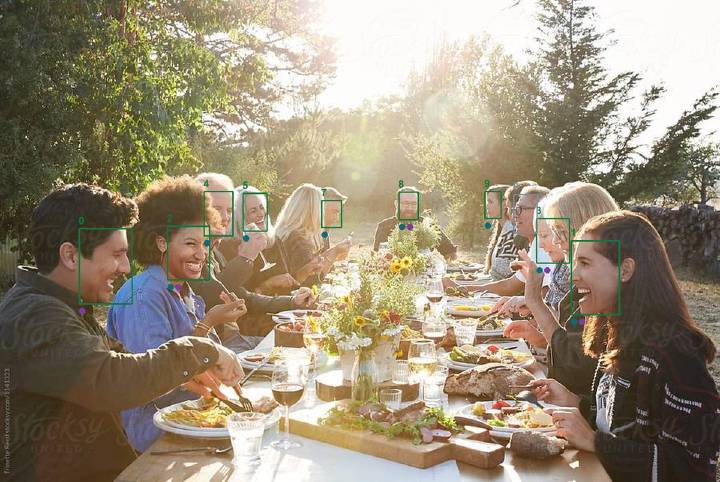
Dinner table — 10 faces, 1200×803. Photo: Trinette Reed, Stocksy 1141323.

Yoga class — 10 faces, 1200×800. Photo: Rob and Julia Campbell, Stocksy 5234262.
The numbers identify faces in the source dataset. Colored dots indicate which services produced a confirmed match: teal for face2social, purple for FaceCheck.ID, and brown for Social Catfish.
The three primary services returned 8,214 candidates in total. That is the number of search results, not the number of manually confirmed answers. The labeling file contains 90 manual judgments, and the original summary calculation used 18 of the 20 faces. Two faces were excluded. For yoga_3, the reviewer later clarified that the results were reviewed but no returned account could be confirmed as belonging to the person being searched. That is an uncertain review outcome, not an unreviewed search. For yoga_8, the original table still shows “Not reviewed.”
The reviewer marked a match when they believed the result showed the same person. Unmarked results for a reviewed face were treated as misses in the original calculation. We also separated several groups of false results that reused the same portraits. This makes it possible to examine specific findings, but it is not a substitute for full independent labeling of every returned result.
Which Face Search Engine Found the Most People?
We first counted searches that produced at least one image of the correct person. By that measure, face2social returned a confirmed result for 15 of the 18 faces in the primary calculation, FaceCheck.ID for 7, and Social Catfish for 2.
| Test result | face2social | FaceCheck.ID | Social Catfish |
|---|---|---|---|
| Faces with at least one confirmed match | 15 of 18 | 7 of 18 | 2 of 18 |
| Faces found only by this service | 9 | 2 | 0 |
| Confirmed results | 23 | 23 | 3 |
| Of those, direct profile links | 23 | 3 | 3 |
| Of those, posts or other pages | 0 | 20 | 0 |
The number of people found and the number of individual results answer different questions. One person can have multiple accounts and can appear in dozens of posts. So the fact that face2social and FaceCheck.ID each had 23 confirmed results does not mean they found the same number of people or were equally useful for the same task.
All 23 confirmed face2social results in this test were profile links. FaceCheck.ID produced three profile links and 20 links to posts or other pages containing the correct person. Social Catfish produced three confirmed results for two people, all of them LinkedIn profiles.
A post can still be useful: the caption may include a name, a tagged account, or another clue. But a post URL by itself does not establish which profile belongs to the person in the image. The post may have been uploaded by a photographer, friend, publication, or unrelated account, leaving the user to determine who is pictured and which account belongs to them.
 | → |  |
|---|
Direct profile linktiktok.com/@safiyatheprincess
face2social · score 71.6 · this face also produced an Instagram result with a score of 65.8
 | → |  |
|---|
Post showing the same personinstagram.com/p/CMP-TjGD8U4/
FaceCheck.ID · score 81 · the reviewer confirmed the face match; the person’s profile still had to be identified
 | → |  |
|---|
False match with a score of 81linkedin.com/in/greg-flowers-a4500423
FaceCheck.ID · score 81 · one of a series of LinkedIn profiles using the same portrait
A direct profile link also has evidentiary limits. Our reviewer confirmed visual identity and separately classified the type of page returned. We did not independently verify who controlled each account; someone else’s photo can be used as a profile image. In the rest of this article, “found profile” means a profile that the reviewer associated with the face being searched, not independently verified account ownership.
Low-Resolution Face Search: What Happened at 23 Pixels
For a group photo, the dimensions of the overall file tell you little about the quality of each individual face. In our dataset, the smallest uploaded crop had a short side of 67 pixels, while the face inside that crop measured only 23 pixels. Those are different measurements: one determines whether a service accepts the file, while the other describes the actual facial detail available for recognition.
Among the reviewed faces, five measured under 30 pixels on the short side. face2social returned a confirmed match for all five; FaceCheck.ID returned none. The smallest face for which FaceCheck.ID produced a confirmed result measured 34×48 pixels. For face2social, it was 23×34.
Below are the results for every face, ordered from smallest to largest. “Found” means at least one confirmed match, including a result that was a post rather than a direct profile.
| Face | Size, px | face2social | FaceCheck.ID | Social Catfish | |
|---|---|---|---|---|---|
 | yoga_9 | 23×34 | Found | Rejected | — |
 | yoga_8 | 24×30 | Not reviewed | · | · |
 | yoga_7 | 25×35 | Found | — | — |
 | yoga_5 | 28×35 | Found | —* | Found |
 | yoga_6 | 28×37 | Found | — | — |
 | dinner_9 | 29×47 | Found | — | — |
 | yoga_3 | 30×37 | Not confirmed | · | · |
 | yoga_4 | 30×39 | Found | Rejected | — |
 | dinner_8 | 34×48 | Found | Found | — |
 | yoga_2 | 35×52 | Found | — | — |
 | dinner_7 | 35×47 | Found | —* | — |
 | yoga_1 | 36×50 | Found | Found | Found |
 | yoga_0 | 39×55 | — | Found | — |
 | dinner_6 | 41×66 | — | —* | — |
 | dinner_5 | 42×65 | Found | —* | — |
 | dinner_4 | 50×76 | Found | — | — |
 | dinner_3 | 57×76 | Found | Found | — |
 | dinner_2 | 72×91 | Found | Found | — |
 | dinner_1 | 82×125 | Found | Found | — |
 | dinner_0 | 90×127 | — | Found | — |
The gray yoga_8 row was not reviewed in the original labeling. The yoga_3 results were reviewed, but no match could be confirmed; that does not prove that every result was a mismatch. A dash in the other rows means no confirmed match. An asterisk marks the repeated-portrait false-result series discussed below; those results were not counted as successful finds.
These five sub-30-pixel cases show an advantage for face2social within this dataset. They do not establish a universal minimum working face size. With only two source photos, we cannot separate the effect of resolution from pose, lighting, or whether the target person exists in a service’s index.
We also encountered upload failures. FaceCheck.ID rejected two crops and reported that it could not detect a valid face. Both files met the 60×60-pixel minimum cited in the original report. In this test, meeting the file-size requirement therefore did not guarantee that a search would be accepted, and the error message did not reveal the exact cause.
In the supplemental Lenso.ai check, eight of the 20 prepared crops failed a 100-pixel minimum on one dimension. That limitation applied to the prepared files themselves. We did not test whether adding more margin or upscaling the image would change the outcome, so it would be incorrect to generalize those eight failures to group photos in general. face2social, Social Catfish, and PimEyes accepted all prepared crops.
Direct Social Profiles vs. Posts: Why Result Type Matters
The difference between profiles and posts appeared throughout the candidate sets, not only among confirmed matches. On Instagram, FaceCheck.ID returned 596 candidates: 17 profiles, 163 posts, and 416 other pages according to our parser. Profiles accounted for about 3%. All 200 Instagram results returned by face2social were classified as profiles. That gap matters most when the goal is to find an Instagram account by picture rather than a post showing the person.
This tells us what kinds of URLs the user received; it does not reveal how a competitor’s underlying index is built. For example, the high share of posts does not mean FaceCheck.ID indexes only post images. On X, 87% of its returned URLs were profiles, and on LinkedIn 72% were profiles.
To compare result composition, we isolated six platforms: Instagram, TikTok, Facebook, X, LinkedIn, and OnlyFans.
| Service | All candidates | On the six platforms | Share |
|---|---|---|---|
| face2social | 800 | 800 | 100% |
| FaceCheck.ID | 3,272 | 1,282 | 39.2% |
| Social Catfish | 4,142 | 369 | 8.9% |
For Social Catfish, the number of displayed result cards matched the result counter in all 20 searches.
The percentage in the last column is not an accuracy metric. In this comparison, face2social searched only four social platforms, while the other two services also returned open-web results. Those four were Instagram, TikTok, Facebook, and X; on TikTok, for instance, that meant a TikTok reverse image search limited to profile pages. A page outside these six domains may still be useful. At the same time, a larger candidate list by itself says nothing about how many correct social profiles were found.
face2social’s coverage was also narrower in an important way: the tested version did not include LinkedIn or OnlyFans. That is a meaningful limitation for someone specifically trying to find a professional profile. Every confirmed Social Catfish result in this pilot was on LinkedIn, a platform face2social did not search at all.
FaceCheck.ID Confidence Scores and False Matches
In five searches, FaceCheck.ID returned groups of LinkedIn profiles using the same portrait, with as many as 11 profiles in one group. The names and companies differed. The repeated image suggests photo reuse, but we cannot call these accounts a confirmed bot network because we did not investigate their origin or ownership.
For evaluating the face search itself, the important point was that the portrait in these flagged false results did not show the person we were searching for. In one example, the query was a woman’s face in profile, while the result showed an older gray-haired man. FaceCheck.ID assigned that result a score of 81.
We compared the scores of 23 confirmed matches with 41 results from the flagged false-match groups.
| FaceCheck.ID results | Count | Score range |
|---|---|---|
| Confirmed matches | 23 | 70–82 |
| Flagged false matches | 41 | 49–83 |
Nineteen false results fell within the same score range as the confirmed matches. The highest score among the flagged false results was 83—higher than the maximum score among confirmed matches.
There was no threshold in this small set that would preserve every confirmed match while excluding every flagged error. That does not prove the score itself is useless: we examined a small, deliberately selected error set, and repeated portraits are not independent observations. The practical conclusion is narrower: a high confidence score in the interface is not a substitute for verifying the match.
Face Search Pricing: Cost per Search vs. Cost per Useful Result
A FaceCheck.ID search cost $0.30 in our test. But a search was charged whether or not it found the intended person. That means the advertised or nominal cost per search is not the same as the cost of obtaining a useful profile result; paid misses remain part of the user’s total cost.
For the 18 faces in the primary calculation, paying for every FaceCheck.ID search works out to 18 × $0.30 = $5.40. Seven searches produced a confirmed match, and only three produced a direct profile. That means the average cost was about $0.77 per search with a confirmed match and $1.80 per search that produced a direct profile. The latter figure includes the cost of the other 15 searches that did not produce a profile.
| FaceCheck.ID: calculation for 18 paid searches | Cost |
|---|---|
| One search, regardless of outcome | $0.30 |
| All 18 searches | $5.40 |
| One successful search out of seven, including post matches | ≈ $0.77 |
| One search that produced a direct profile; there were three | $1.80 |
There were 20 searches per service in the experiment, but two faces were excluded from the original primary calculation: yoga_3, where no match was confirmed after review, and yoga_8, which was marked unreviewed. If FaceCheck.ID charged for all 20 searches, the total would have been $6. Based on the seven already confirmed successful searches, that would be about $0.86 per successful search and $2 per search that produced one of the three direct profiles. This is a separate scenario: the source report does not contain a complete billing log, and the two excluded faces have different review statuses.
For the cross-service comparison below, we use the same basis for all three services: the 18 faces in the original primary calculation and the per-search cost assumptions recorded in the source report. Paid misses are included in all three rows.
| Service | Per-search cost used | Cost for 18 searches | Faces with a match | Cost per successful query |
|---|---|---|---|---|
| face2social | ≈ $2.00 | ≈ $36.00 | 15 of 18 | ≈ $2.40 |
| FaceCheck.ID | $0.30 | $5.40 | 7 of 18 | ≈ $0.77 |
| Social Catfish | $3.60 at 10 searches/month | $64.80* | 2 of 18 | ≈ $32.40 |
This is a calculation based on assumed per-search costs, not a statement of actual charges. For face2social, the source report used a $19.99 subscription for 10 reports, assuming the full bundle was used. Social Catfish was listed at $36; $3.60 per search assumes 10 searches in a month. *$64.80 is the amount allocated to 18 searches under that usage scenario, not the price of an 18-search package.
Even after including paid misses, FaceCheck.ID remained the least expensive service per confirmed result in this dataset. But a direct profile cost six times the nominal search price: $1.80 versus $0.30. That distinction matters when a user is looking for one specific person rather than averaging results over a batch: a failed search still costs money while leaving the task unresolved.
If a user responds to a miss by trying another photo or crop, each additional paid search increases the effective cost. We did not run those retries, so this pilot does not measure how many attempts a typical user needs before finding a useful result.
Prices are reproduced from the source report, which did not record when they were captured. They are inputs to this experiment’s calculation, not a verification of current pricing. Unused searches in a subscription can also raise the effective cost per result.
Why PimEyes, Lenso.ai, and TinEye Are Not in the Main Ranking
We also tested PimEyes, Lenso.ai, and TinEye, but kept them outside the main three-service comparison because the depth of testing and the products’ intended functions differed. Their exclusion defines the scope of the experiment; it is not evidence that only three face search tools are relevant.
PimEyes. PimEyes accepted every prepared crop. For one face, it returned 12 results that the reviewer believed showed the same person, all from web pages. According to the service description cited in the source report, social networks were excluded from its search. That successful example is important: PimEyes’ absence from our social-profile table should not be interpreted as poor facial-recognition performance.
Lenso.ai. Based on the visible results, Lenso.ai searched images across the web, and every photo on the first screen was a stock image. We did not determine whether deeper results included social profiles because viewing the full list required a more expensive subscription that we did not purchase for this pilot. The service also rejected eight of the 20 prepared crops because one image dimension was below its minimum. Because some searches never passed the upload stage and we saw only the beginning of the result set for the others, this test cannot establish how well Lenso.ai finds social profiles.
TinEye. TinEye is designed to find copies of an image. We used it as a separate comparison point, but did not evaluate it as a tool for finding social media accounts by face.
Limitations of This Face Search Test
The first limitation is the source material. We tested people who appeared in stock photos. Their images may circulate differently from photos of ordinary social media users. In addition, the 20 faces came from only two scenes, not from 20 independently selected portraits, so people within each image share the same shooting conditions.
The second limitation is ground truth. We do not know every genuine account belonging to every person in the photos. Some correct results may have gone unmarked, and a visual identity judgment may itself be wrong. For that reason, the share of searches with a confirmed result should not be described as either full accuracy or search recall. We also have no basis for assuming that incomplete ground truth affects all three services equally.
The third limitation is access to the full result set. face2social displayed 800 candidates, but URLs were revealed for 168 of them. All confirmed face2social finds were within that revealed subset. The remaining results could not be checked with the same confidence for destination URL and profile ownership.
The fourth limitation is labeling and reproducibility. One person performed the review. A stronger benchmark would use independent reviewers and predefined rules for resolving disagreements. The HTML report contains tables and illustrations, but it does not link to the claimed raw service responses or the labeling file. Without those materials, a reader cannot independently reproduce the calculation.
There is also a concrete discrepancy that should remain visible. In the saved labeling, face2social had 15 successful faces out of 18. When those labels were later compared with a newer result set, an interactive dashboard showed 14 of 17: one previously confirmed account was no longer returned, and that face dropped out of the denominator. This article uses the saved-labeling result. A reproducible benchmark needs both a frozen snapshot of the results and a fixed set of queries so changes in search output cannot silently change the denominator.
The 15, 7, and 2 figures therefore refer to the 18 faces used in the original calculation. The clarified status of yoga_3 appears in the per-face table, but that clarification alone is not a complete recomputation of every service’s summary. Before treating this as a formal benchmark, the exact denominator should be fixed: if the metric is “share of reviewed searches with a confirmed find,” a reviewed search with no confirmed match should still be included. These figures are not yet a promise of performance for arbitrary people and photos.
Which Face Search Engine Was Best in This Pilot?
The pilot helped separate three events that are often collapsed into the word “found”: the service returned a similar image, the reviewer recognized the correct person, and the user received a link to the person’s apparent social profile. Each event requires a different metric.
For the specific goal of finding a direct social media profile from a face, face2social produced the strongest result in this dataset: it found confirmed matches for more people and every one of its 23 confirmed results was a profile link. FaceCheck.ID was substantially cheaper per confirmed result even after paid misses were included, but most of its confirmed results were posts or other pages rather than profiles. Social Catfish found LinkedIn profiles on a platform face2social did not cover.
Those differences are more useful than a single universal ranking. They show what each service actually returned and what the outcome cost under the assumptions used in this experiment.
A larger follow-up test has been designed but was postponed because of budget. A stronger version would use people with pre-verified accounts, independent reviewers, and frozen result sets. The central question would remain the same: after a face search engine recognizes the person, where does the user actually land?
More Reviews and Comparisons
- The Best Free Alternatives to PimEyes — social media face search sites to try instead of PimEyes, including FaceCheck.ID and Lenso.ai.
- Secure Alternatives to FaceCheck.ID — reverse social media image search tools to use instead of FaceCheck.ID, from PimEyes to Lenso.
- The Best Alternatives to Lenso — social media facial recognition tools for checking who is really behind a dating profile.
- Why You Need an Alternative to TinEye — TinEye’s limits for people searches, plus the pros and cons of four other options.
- ProFaceFinder: An Honest Review — what ProFaceFinder does well, where it falls short, and what its users report.
- 5 Accurate Alternatives to ProFaceFinder — how to choose a photo-based people search tool, with five options compared.
- FaceSeek.online Review — features, real-world use cases, and limitations of the FaceSeek.online face search.
- An In-Depth Review of Reversely.ai — an AI reverse image search with an image detector, and where its accuracy falls short.
- Reverselay AI Review — what Reverselay AI does well, where it struggles, and top alternatives for face recognition search.
- Is ClarityCheck Legit? — ClarityCheck’s image search, phone number lookup, and identity reports, and how far to trust its data.
- What Is the Best Social Media Face Search Tool? — a dating-safety guide to spotting fake profiles and building a verification routine.
- How to Find Someone’s Social Media Accounts by Photo for Free — four free methods, including Google Lens, Bing, and DuckDuckGo, and where facial recognition tools help.
- Is This Dating Profile Fake? — the warning signs of a fake dating profile and how to verify a match with face search.
Face Search Engine FAQ
Which face search engine found the most people in this test?
face2social. In the primary 18-face analysis, it produced at least one confirmed match for 15 people, compared with 7 for FaceCheck.ID and 2 for Social Catfish.
Which tool returned the most direct social media profile links?
face2social returned 23 confirmed profile links. FaceCheck.ID returned three confirmed profile links and 20 confirmed results that led to posts or other pages. Social Catfish returned three confirmed profile links, all on LinkedIn.
Which face search service was cheapest per confirmed result?
Under the pricing assumptions recorded in the source report, FaceCheck.ID was cheapest at about $0.77 per successful query, compared with about $2.40 for face2social and $32.40 for Social Catfish. These are experiment calculations, not current-price quotes.
Did a high FaceCheck.ID score guarantee a correct match?
No. In this pilot, confirmed matches scored 70–82, while the flagged false-match set ranged from 49–83. Nineteen flagged false results fell within the confirmed-match score range.
Can these results be treated as an independent ranking of the best face search engines?
No. face2social conducted the experiment, the test used only two stock photos and one reviewer, and the complete set of true accounts was unknown. The findings are useful as a pilot comparison, not as a universal accuracy benchmark.
What Types of Links Did Each Service Return?
URL classification from the source report. “Profile” describes the type of URL and does not mean the candidate was a confirmed match to the person being searched.
| Service | Platform | Results | Profiles | Posts | Other pages | Profile share |
|---|---|---|---|---|---|---|
| face2social | 200 | 200 | 0 | 0 | 100% | |
| face2social | TikTok | 200 | 200 | 0 | 0 | 100% |
| face2social | 200 | 200 | 0 | 0 | 100% | |
| face2social | X | 200 | 200 | 0 | 0 | 100% |
| FaceCheck.ID | 596 | 17 | 163 | 416 | 3% | |
| FaceCheck.ID | TikTok | 76 | 18 | 58 | 0 | 24% |
| FaceCheck.ID | 197 | 82 | 85 | 30 | 42% | |
| FaceCheck.ID | X | 61 | 53 | 8 | 0 | 87% |
| FaceCheck.ID | 350 | 251 | 11 | 88 | 72% | |
| FaceCheck.ID | OnlyFans | 2 | 2 | 0 | 0 | 100% |
| Social Catfish | 54 | 3 | 4 | 47 | 6% | |
| Social Catfish | TikTok | 11 | 0 | 11 | 0 | 0% |
| Social Catfish | 27 | 6 | 15 | 6 | 22% | |
| Social Catfish | X | 19 | 11 | 8 | 0 | 58% |
| Social Catfish | 258 | 109 | 3 | 146 | 42% |
Confirmed Results by Social Platform
“Candidates” means every returned result on that platform; “matches” means results marked by the reviewer; “faces” means the number of searches with at least one such match. A dash means no confirmed result. “Not indexed” means the service did not search that platform.
| Platform | face2social Candidates | face2social Matches | face2social Faces | FaceCheck.ID Candidates | FaceCheck.ID Matches | FaceCheck.ID Faces | Social Catfish Candidates | Social Catfish Matches | Social Catfish Faces |
|---|---|---|---|---|---|---|---|---|---|
| 200 | 12 | 12 | 596 | 13 | 4 | 54 | — | — | |
| TikTok | 200 | 3 | 3 | 76 | — | — | 11 | — | — |
| 200 | 5 | 4 | 197 | 8 | 3 | 27 | — | — | |
| X | 200 | 3 | 3 | 61 | 2 | 2 | 19 | — | — |
| Not indexed | Not indexed | Not indexed | 350 | — * | — | 258 | 3 | 2 | |
| OnlyFans | Not indexed | Not indexed | Not indexed | 2 | — | — | 0 | — | — |
The LinkedIn asterisk marks the repeated-portrait result groups that were not counted as successful finds.
Observed Search Speed
These measurements were taken on one computer and one connection. Depending on the service, we recorded only one to three runs. They describe those specific runs and should not be treated as typical service speed.
| Service | First result, sec. | Last image, sec. | Runs |
|---|---|---|---|
| face2social | 10.1 | 11.7 | 3 |
| FaceCheck.ID | Not measured | 10.0 | 1 |
| Social Catfish | 37.0 | 57.5 | 1 |
| PimEyes | 1.4 | 38.0 | 1 |
| Lenso.ai | Not measured | 1–2 | 1 |
| TinEye | 2.5 | 2.9 | 2 |
face2social initially displayed 40 of 80 candidates, with the remainder behind a Load more button. FaceCheck.ID returned up to roughly 200 results. In the observed Social Catfish run, the report appeared to be ready around 11 seconds, but the button to open it appeared at about 37 seconds. For PimEyes, we measured the first preview page: network data arrived in roughly 7 seconds, while rendering the image grid took about 38 seconds. Lenso.ai’s full results were restricted by its subscription. These interface differences make “time to last image” an imperfect measure of pure search speed.
Photos: Dinner table — Trinette Reed, Stocksy 1141323; Yoga class — Rob and Julia Campbell, Stocksy 5234262. The source report identifies the images as licensed; this editorial version did not independently verify the license terms.
According to the authors’ description, paid-access limits and usage rules were followed, and searches were performed manually where automation was unavailable. This article evaluates search services and is not intended for employment, credit, insurance, or housing decisions.